Not the homepage I expected
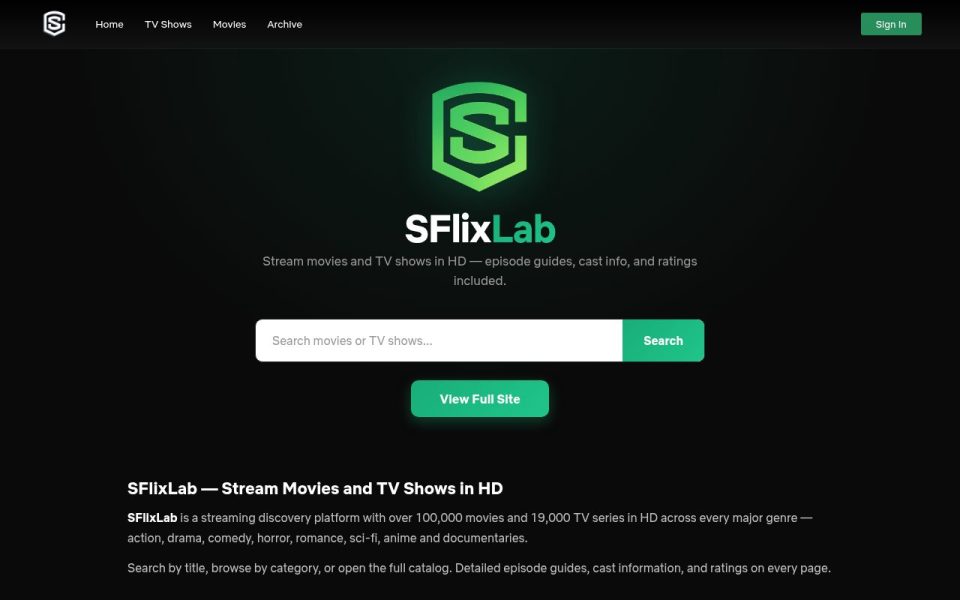
Most free streaming sites hit you with a wall of posters the second the page loads. SFlixLab opens on a glowing green shield logo, a one-line pitch, a white search box and a single button that says View Full Site. That’s the whole first screen. Scroll down and it turns into an explainer page: a Why SFlixLab block with six feature tiles, a How to Stream section and an FAQ. It reads like a page written for Google first and for people second, and the real browsing lives one click further in.
To be fair, you’re not trapped. The top bar has Home, TV Shows, Movies and Archive, plus a green Sign In button on the right, and the search box sits dead centre where your eyes land anyway. I just would’ve traded those feature tiles for one row of this week’s releases.
What’s supposedly in the library
The site says it carries over 100,000 movies and 19,000 TV series, with most titles in 1080p and some 4K where the source allows. Those are the site’s numbers, not mine. The genre list is the usual spread (action, horror, sci-fi, romance), plus subbed and dubbed anime and documentaries split into true crime, nature and history. The footer also lets you browse by country, with the United States, the UK, Japan, Canada, France and South Korea on the list, which is handy if you’re hunting K-dramas or Japanese films.
Going by the site’s own how-to, a title page gives you a choice of servers, and you pick quality and subtitles in the player. That’s the standard SFlix-style setup. The footer disclaimer admits the files sit on third-party hosts, so expect the odd dead server and keep a second one in mind.
Looks and speed
Near-black background, white text, mint-green buttons. It’s tidy and easy on the eyes at night. The code even loads a font called Netflix Sans, which is a bold choice for an unofficial streaming site, and the Ninja has to respect the nerve. The page has a proper mobile layout, and it felt quick to load on my visit.
Ads, trackers and the extension pitch
On the landing page I saw no ad networks and no popups, just Google Analytics, Tag Manager and Cloudflare’s stats script. That’s cleaner than nearly every site in this genre. I can’t promise the pages past View Full Site stay that clean, because free streaming has to pay for itself somewhere.
One thing I’d skip: the FAQ suggests installing a Stream Finder browser extension to get alerts about new content. A streaming site’s extension usually wants to read your browsing, and a bookmark does the same job without that risk.
Should you bother?
If you already know the title you want, the search-first approach is quick and there’s no account needed; the optional sign-up only adds a watchlist and history. If you like to browse and discover, the front page gives you almost nothing to chew on, and you’ll be clicking straight past it every time.