This is a GitHub page, not a website
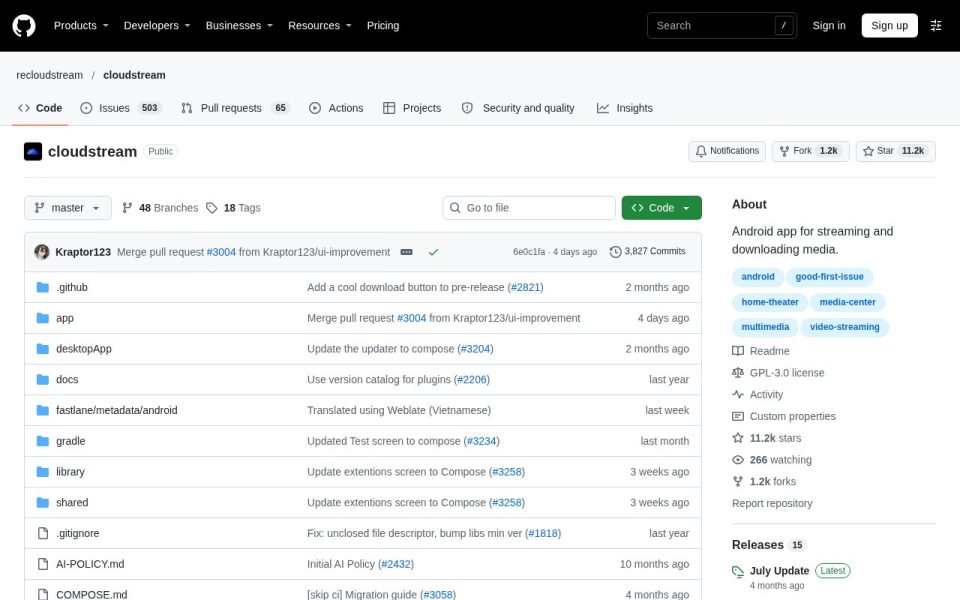
The link for CloudStream goes straight to a GitHub repository, recloudstream/cloudstream, so there’s no landing page, no hero banner and no ads. Just the standard GitHub layout: file list on the left, an About box on the right that reads Android app for streaming and downloading media, and tags like android, home-theater and media-center. If you’ve never used GitHub, the page can look like a wall of folders. The parts you care about are the README below the files and the Releases box in the sidebar.
The big warning up front
The README opens with the most important line on the page: by default, this app doesn’t provide any video sources; you have to install extensions to add functionality. That’s the whole design. CloudStream is a player and library shell, and extensions decide what it can actually show. The README’s own examples are Librevox audiobooks, YouTube, Twitch and the iptv-org list of public IPTV channels. It also asks people not to create or use extensions that host copyrighted media, and notes that sources listed in its docs aren’t moderated or endorsed by the project.
So out of the box you’ll open it and find an empty app. That surprises a lot of first-time users.
What the app itself does
The feature list is short and refreshingly blunt: AdFree, No ads whatsoever, no tracking or analytics, bookmarks, phone and TV support, Chromecast, and an extension system for customisation. It’s licensed GPL-3.0. That combination, open source with no ads and no trackers, is the main reason people pick it over closed streaming APKs that show up on random download sites.
Is the project alive?
Very much. On my visit the repo had 11.2k stars, 1.2k forks, 3,827 commits and 517 contributors. The latest commit was four days old, a merged UI-improvement pull request, and recent commit messages talk about moving screens over to Compose and updating the desktop app’s updater. There’s a desktopApp folder sitting next to the Android code, which hints at life beyond phones. The flip side is 503 open issues, though for a project this size that’s normal. The latest tagged release in the sidebar was the July Update, four months old, with newer work going into pre-releases. Someone also left the LICENSE file’s last commit message as Merry Fucking Christmas, which tells you it’s run by humans.
Getting it safely
This is the part that matters most. CloudStream’s popularity means there are lots of unofficial sites offering the APK, and some of them bundle junk. The Releases section of this repository is the place to download it, and the README links to documentation for installation. Extensions are a separate trust decision: they’re written by third parties, so stick to well-known ones and be choosy about what you add.
Who it suits
Android and Android TV users who like tinkering, want a clean player with no ads and are happy to set things up themselves. If you want something that works the moment you install it, this isn’t that app.